Lesson5 与机器学习框架的整合
本节课大纲:
通过张量表达式(te)构建TensorIR(即@T.prim_func)
使用BlockBuilder构造IRModule
5.1 通过张量表达式构建TensorIR
回顾使用张量表达式 (tensor expression, TE)来构建TensorIR函数
(1)创建输入
1
2
3
4
5
from tvm import teA = te.placeholder((128 , 128 ), name="A" , dtype="float32" ) B = te.placeholder((128 , 128 ), name="B" , dtype="float32" )
这里的A和B的类型都是te.Tensor对象,每个te.Tensor都有一个shape字段和dtype字段
TE 当中,tvm.te.Tensor 是指计算图中的某个数据块,概念类似于神经网络中的一个 feature map。例如,神经网络的 RGB Input 就是一个 Tensor;神经网络中 Conv、Pooling 算子的计算结果也是一个 Tensor。
(2)描述计算过程
1
2
3
4
5
6
7
8
def te_matmul (A: te.Tensor, B: te.Tensor ) -> te.Tensor: assert A.shape[1 ] == B.shape[0 ] n = A.shape[0 ] m = B.shape[1 ] k = te.reduce_axis((0 , A.shape[1 ]), name="k" ) return te.compute((n, m), lambda i, j: te.sum (A[i, k] * B[k, j], axis=k), name="matmul" ) C = te_matmul(A, B)
这里使用到了te.compute这样的接口,从一个或者多个前序节点接收数据,并按初始化的时候传入的 lambda 表达式计算 Tensor 内的数据。
之后我们使用te_matmul使用A和B获得计算结果,至此完成了计算图的描述。
(3)创建TensorIR函数
1 te.create_prim_func([A, B, C]).show()
可以调用 te.create_prim_func 并传入输入和输出值,至此生成一个TensorIR函数
利用类似的方法,我们可以为ReLu生成一个张量表达式
1
2
3
4
5
6
def te_relu (A: te.Tensor ) -> te.Tensor: return te.compute(A.shape, lambda *i: te.max (A(*i), 0 ), name="relu" ) X1 = te.placeholder((10 ,), name="X1" , dtype="float32" ) Y1 = te_relu(X1) te.create_prim_func([X1, Y1]).show()
(4)算子融合
te API 允许我们做的另一件事是组合操作并创建“融合 (fused)”算子。例如,我们可以将 matmul 的结果再次应用 relu。
1
2
C = te_matmul(A, B) D = te_relu(C)
我们可以通过只传递感兴趣的输入和输出值,跳过中间值来创建一个 TensorIR 函数。 这将导致 matmul 的结果被分配为 TensorIR 函数中的临时空间(TensorIR函数中会出现中间结果分配函数:matmul = T.alloc_buffer((128, 128))的语句 )
1 te.create_prim_func([A, B, D]).show()
我们还可以将中间结果 C 传递到参数列表中 。在这种情况下,TensorIR 函数希望我们也从调用方传入 C。通常我们建议只传入输入和输出,这样我们就可以在里面进行更高级的融合。
1 te.create_prim_func([A, B, C, D]).show()
5.2 使用BlockBuilder构造IRModule
目前我们已经构建了一个TensorIR函数,为了构建端到端的模型执行,我们还需要能够通过计算图连接多个TensorIR函数。
我们可以创建一个block builder,它可以帮助我们逐步构建一个relax.Function。
1
2
3
4
5
6
7
8
9
10
11
12
13
14
A = relax.Var("A" , relax.TensorStructInfo((128 , 128 ), "float32" )) B = relax.Var("B" , relax.TensorStructInfo((128 , 128 ), "float32" )) bb = relax.BlockBuilder() with bb.function("main" ): with bb.dataflow(): C = bb.emit_te(te_matmul, A, B) D = bb.emit_te(te_relu, C) R = bb.emit_output(D) bb.emit_func_output(R, params=[A, B]) MyModule = bb.get() MyModule.show()
终端得到的输出为
1 2 3 4 5 6 7 8 9 10 11 12 13 14 15 16 17 18 19 20 21 22 23 24 25 26 27 28 29 30 31 32 33 34 35 36 37 38 39 @I.ir_module class Module : @T.prim_func def te_matmul (rxplaceholder: T.Buffer((T.int64(128 128 ), "float32" ), rxplaceholder_1: T.Buffer((T.int64(128 128 ), "float32" ), matmul: T.Buffer((T.int64(128 128 ), "float32" ) ): T.func_attr({"tir.noalias" : True }) for i, j, k in T.grid(T.int64(128 ), T.int64(128 ), T.int64(128 )): with T.block("matmul" ): v_i, v_j, v_k = T.axis.remap("SSR" , [i, j, k]) T.reads(rxplaceholder[v_i, v_k], rxplaceholder_1[v_k, v_j]) T.writes(matmul[v_i, v_j]) with T.init(): matmul[v_i, v_j] = T.float32(0 ) matmul[v_i, v_j] = matmul[v_i, v_j] + rxplaceholder[v_i, v_k] * rxplaceholder_1[v_k, v_j] @T.prim_func def te_relu (rxplaceholder: T.Buffer((T.int64(128 128 ), "float32" ), relu: T.Buffer((T.int64(128 128 ), "float32" ) ): T.func_attr({"tir.noalias" : True }) for i0, i1 in T.grid(T.int64(128 ), T.int64(128 )): with T.block("relu" ): v_i0, v_i1 = T.axis.remap("SS" , [i0, i1]) T.reads(rxplaceholder[v_i0, v_i1]) T.writes(relu[v_i0, v_i1]) relu[v_i0, v_i1] = T.max (rxplaceholder[v_i0, v_i1], T.float32(0 )) @R.function def main (A: R.Tensor((128 , 128 "float32" ), B: R.Tensor((128 , 128 "float32" ) ) -> R.Tensor((128 , 128 ), dtype="float32" ): cls = Module with R.dataflow(): lv = R.call_tir(cls.te_matmul, (A, B), out_sinfo=R.Tensor((128 , 128 ), dtype="float32" )) lv1 = R.call_tir(cls.te_relu, (lv,), out_sinfo=R.Tensor((128 , 128 ), dtype="float32" )) gv: R.Tensor((128 , 128 ), dtype="float32" ) = lv1 R.output(gv) return gv
5.3 深入理解 BlockBuilder API
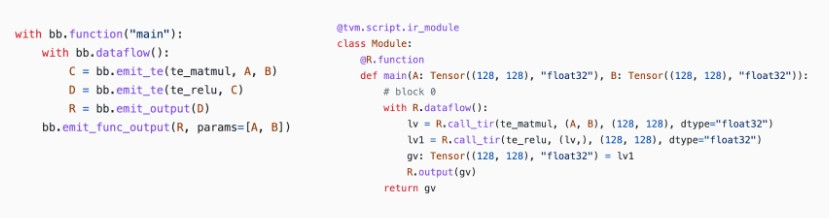
对比BlockBuilder代码和生成的IRModule
BlockBuilder 带有与 Relax 函数中相应的作用域。例如,bb.dataflow() 创建一个 dataflow block,其中所有对 BlockBuilder 的调用都处在 dataflow block 的作用域中。
其中每个中间结果都是一个relax.Var,对应一个存储计算结果的变量。
1
2
3
4
5
6
7
type (C)tvm.relax.expr.DataflowVar isinstance (C, relax.Var)True
Relax 函数中的每一行都是由 emit_te 调用生成的。 例如,
1 lv = R.call_dps_packed(te_matmul, (A, B), (128 , 128 ), dtype="float32" )
是由如下代码所生成
1 C = bb.emit_te(te_matmul, A, B).
综上所述,bb.emit_te做了以下事情:
为 A 和 B 创建一个输入 te.placeholder。
通过 te_matmul 函数运行它们(构建计算图?)
调用 te.create_prim_func 来创建一个 TensorIR 函数。
通过 call_dps_packed 生成对函数的调用。
值得注意的是我们有两种方式来指定函数的参数列表:
方式一:
1
2
3
4
with bb.function("main" ): ... bb.emit_func_output(R, params=[A, B])
方式二:
1 2 3 4 with bb.function("main" , params=[A, B]): ... bb.emit_func_output(R)
5.4 从 PyTorch 导入模型
前文已经学习了以编程方式构建 IRModule 的工具,现在我们将使用它们将机器学习模型从 Pytorch导入成为IRModule。
大多数机器学习框架都带有计算图抽象,其中每个节点对应一个操作,边对应它们之间的依赖关系。 我们将采用 PyTorch 模型,获取 PyTorch 原生格式的计算图,并将其转换为 IRModule。
模型定义如下,示例为一个matmul+ReLU
1
2
3
4
5
6
7
8
9
class MyModel (nn.Module): def __init__ (self ): super (MyModel, self).__init__() self.weight = nn.Parameter(torch.randn(128 , 128 )) def forward (self, x ): x = torch.matmul(x, self.weight) x = torch.relu(x) return x
5.4.1 创建 TorchFX GraphModule
使用TorchFX来表示来自PyTorch的模型的计算图
1
2
3
4
5
6
model = MyModel() fx_module = fx.symbolic_trace(model) type (fx_module)fx_module.graph.print_tabular()
我们的目标是将这个计算图转化成IRModule
5.4.2 构造映射函数
让我们定义整体的翻译逻辑。 主要流程如下:
创建一个 node_map,将 fx.Node 映射到相应的 relax.Var,该 relax.Var 代表 IRModule 中的已翻译节点。
以拓扑顺序迭代 FX 图中的节点。
给定映射输入,获取节点的映射输出。
1
2
3
4
5
6
7
8
9
10
11
12
13
14
15
16
17
18
19
20
21
22
23
24
25
26
27
28
29
30
31
32
33
34
35
36
37
38
39
40
41
42
43
44
45
46
47
48
49
50
def map_param (param: nn.Parameter ): return relax.const( param.data.cpu().numpy(), relax.TensorStructInfo(param.data.shape, "float32" ) ) def fetch_attr (fx_mod, target: str ): """Helper function to fetch an attr""" target_atoms = target.split('.' ) attr_itr = fx_mod for i, atom in enumerate (target_atoms): if not hasattr (attr_itr, atom): raise RuntimeError(f"Node referenced nonexistant target {'.' .join(target_atoms[:i])} " ) attr_itr = getattr (attr_itr, atom) return attr_itr def from_fx (fx_mod, input_shapes, call_function_map, call_module_map ): input_index = 0 node_map = {} named_modules = dict (fx_mod.named_modules()) bb = relax.BlockBuilder() fn_inputs = [] fn_output = None with bb.function("main" ): with bb.dataflow(): for node in fx_mod.graph.nodes: if node.op == "placeholder" : shape = input_shapes[input_index] input_index += 1 input_var = relax.Var( node.target, relax.TensorStructInfo(shape, "float32" ) ) fn_inputs.append(input_var) node_map[node] = input_var elif node.op == "get_attr" : node_map[node] = map_param(fetch_attr(fx_mod, node.target)) elif node.op == "call_function" : node_map[node] = call_function_map[node.target](bb, node_map, node) elif node.op == "call_module" : named_module = named_modules[node.target] node_map[node] = call_module_map[type (named_module)](bb, node_map, node, named_module) elif node.op == "output" : output = node_map[node.args[0 ]] assert fn_output is None fn_output = bb.emit_output(output) bb.emit_func_output(output, fn_inputs) return bb.get()
我们没有在 from_fx 函数中定义函数映射。 我们将通过映射提供每个 torch function 的翻译规则。 具体来说,以下代码块显示了我们如何通过 emit_te API 做到这一点。
1
2
3
4
5
6
7
8
9
10
11
12
13
14
15
16
17
18
19
20
def map_matmul (bb, node_map, node: fx.Node ): A = node_map[node.args[0 ]] B = node_map[node.args[1 ]] return bb.emit_te(te_matmul, A, B) def map_relu (bb, node_map, node: fx.Node ): A = node_map[node.args[0 ]] return bb.emit_te(te_relu, A) MyModule = from_fx( fx_module, input_shapes = [(1 , 128 )], call_function_map = { torch.matmul: map_matmul, torch.relu: map_relu, }, call_module_map={}, ) MyModule.show()
5.5 FashionMNIST示例
1
2
3
4
5
6
7
8
9
10
11
12
13
14
15
16
17
18
19
20
21
22
23
24
25
26
27
28
29
30
31
32
33
34
35
36
37
38
39
40
41
42
43
44
45
46
47
48
49
50
51
52
53
54
55
56
57
58
59
60
61
62
63
64
65
66
67
68
69
70
71
72
73
74
import torchimport torchvisiontest_data = torchvision.datasets.FashionMNIST( root="data" , train=False , download=True , transform=torchvision.transforms.ToTensor() ) test_loader = torch.utils.data.DataLoader(test_data, batch_size=1 , shuffle=True ) class_names = ['T-shirt/top' , 'Trouser' , 'Pullover' , 'Dress' , 'Coat' , 'Sandal' , 'Shirt' , 'Sneaker' , 'Bag' , 'Ankle boot' ] img, label = next (iter (test_loader)) img = img.reshape(1 , 28 , 28 ).numpy() !wget -nc https://github.com/mlc-ai/web-data/raw/main/models/fasionmnist_mlp_params.pkl class MLP (nn.Module): def __init__ (self ): super (MLP, self).__init__() self.linear0 = nn.Linear(784 , 128 , bias=True ) self.relu = nn.ReLU() self.linear1 = nn.Linear(128 , 10 , bias=True ) def forward (self, x ): x = self.linear0(x) x = self.relu(x) x = self.linear1(x) return x import pickle as pklmlp_model = MLP() mlp_params = pkl.load(open ("fasionmnist_mlp_params.pkl" , "rb" )) mlp_model.linear0.weight.data = torch.from_numpy(mlp_params["w0" ]) mlp_model.linear0.bias.data = torch.from_numpy(mlp_params["b0" ]) mlp_model.linear1.weight.data = torch.from_numpy(mlp_params["w1" ]) mlp_model.linear1.bias.data = torch.from_numpy(mlp_params["b1" ]) torch_res = mlp_model(torch.from_numpy(img.reshape(1 , 784 ))) pred_kind = np.argmax(torch_res.detach().numpy(), axis=1 ) print ("Torch Prediction:" , class_names[pred_kind[0 ]])from tvm import topidef map_nn_linear (bb, node_map, node, nn_mod ): x = node_map[node.args[0 ]] w = map_param(nn_mod.weight) if nn_mod.bias is not None : b = map_param(nn_mod.bias) y = bb.emit_te(topi.nn.dense, x, w) return bb.emit_te(topi.add, y, b) def map_nn_relu (bb, node_map, node, nn_mod ): return map_relu(bb, node_map, node) MLPModule = from_fx( fx.symbolic_trace(mlp_model), input_shapes = [(1 , 784 )], call_function_map={ }, call_module_map={ torch.nn.Linear: map_nn_linear, torch.nn.ReLU: map_nn_relu, }, ) MLPModule.show()